![Navix Logo - Purple-1.png]](https://hs.navix.io/hs-fs/hubfs/Navix%20Logo%20-%20Purple-1.png?height=50&name=Navix%20Logo%20-%20Purple-1.png)
This enhancement gives you deeper visibility into how charges were calculated, helps you identify the root cause of variances faster, and improves the consistency of data flowing between Navix and your TMS or billing systems.
🎯 What’s New?
The updated Charge Grid introduces:
-
More granular rate breakdowns (Rate, Quantity, Qualifier)
-
Cleaner side-by-side comparison of Order, Vendor, Audit, and Customer charges
-
Improved visual hierarchy so you can scan charges and variances more quickly
-
New API fields that support more detailed inbound and outbound charge data
These updates make it significantly easier to audit invoices and quickly understand where variances are coming from — saving teams time and reducing back-and-forth with carriers or customers.
🖥️ Updated UI: Before & After
Below is a comparison to help you see what changed.
Before (Legacy Charge Grid)
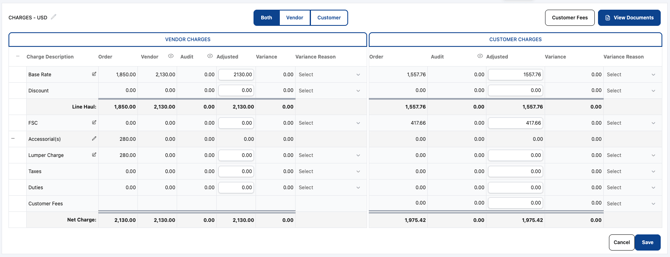
After (New Charge Grid)
-2.png?width=670&height=406&name=image%20(2)-2.png)
💡 What’s improved?
-
Charges display in a more intuitive, grouped layout
-
Quantity and qualifier values are now visible
-
Adjustments and variances stand out more clearly
-
Faster identification of misrated charges and mismatches
🔌 API Enhancements (Before & After)
To support the new Charge Grid, Navix now accepts and returns more detailed charge data via API.
Before: Charge API Object
{
     "Charge": 500.0,
     "ItemId": null,
     "Code": {
           "Description": "Line Haul",
          "Value": "BAS"
     }
}
After: Charge API Object (New Fields Added)
{
     "Charge": null,
     "ItemId": null,
     "Code": {
          "Description": "Line Haul",
           "Value": "BAS"
     },
     "Rate": 5.00,
     "Quantity": 100,
     "Qualifier": "PerMile
}
📘 What this means for integrations:
-
More precise charge calculations can now be passed into Navix
-
Systems can send in rate-based charges, instead of only final totals
-
Variances can be resolved faster because Navix understands “how” charges were calculated
-
Outbound webhook data from Navix now includes these fields, allowing your TMS or billing system to store:
-
Rate used
-
Quantity used
-
Qualifier (Per Mile, Per Pound, Per Hundredweight, etc.)
-
If any of the new fields are not applicable for a particular charge, they can be sent as null. Please view the new schema and Enums available here.
⚙️ How This Helps Your Workflow
Users can now:
-
Compare Order vs. Vendor vs. Audit data at a more detailed level
-
Spot incorrect quantities or multipliers instantly
-
Understand variances without opening multiple screens
-
Resolve exceptions faster
-
Reduce manual calculations or back-checking in the TMS
This update is especially helpful for complex rating scenarios such as:
-
LTL shipments
-
Per-mile charges
-
Fuel surcharges with mileage or percentage components
⚠️ Frequently Asked Questions?
What will the UI changes mean for my users when this is released? Users will no longer update the 'Adjusted' column in the UI. They will now update the 'Adjusted Rate' column in the UI.
What if a user creates a qualifier in the UI and we haven't mapped them from the API? We will always populate the 'charge' or total amount in the Audit Results so this should not affect the integration or cause any loss of data or errors.
Will I need to include/add anything to continue to use Flat Rates? No, you do not need to pass in 'rate', 'quantity', or 'qualifier' for flat rates; continue to pass in 'charge' via the API.
What happens if my 'charge' doesn't equal what my 'rate' times 'quantity' equals? This is currently not possible. You will either pass in a 'charge' OR 'rate and 'quantity. You will receive an error if you try to pass in data for both options.
Does ANYTHING change in my integration if I choose to continue with just Flat Rates ONLY? No, the APIs to both receive and send rate qualifiers have already been live for weeks; we have not seen any interruption of integrations with these changes.
If I choose to start using qualifiers via integration are there any considerations besides sending and receiving the additional fields? Yes, we have started to include 4 decimal places in all returned rates in the Audit Results. If you begin to use qualifiers you may see up to 4 decimal places returned and may need to create some logic to round these results before passing them to your TMS/ERP.
🙋 Need Help or Have Questions?
We're here to help with:
-
API guidance
-
Mapping rate/quantity fields
-
Testing the new Charge Grid workflow
Email us anytime at support@navix.io or join our next Monthly Office Hours for a live walkthrough.