![Navix Logo - Purple-1.png]](https://hs.navix.io/hs-fs/hubfs/Navix%20Logo%20-%20Purple-1.png?height=50&name=Navix%20Logo%20-%20Purple-1.png)
🚀 Enhancements
Charge Grid Update: Rate Qualifiers
- Introduced an updated Charge Grid with enhanced clarity and flexibility
- New improvements include:
- More granular rate breakdowns (Rate, Quantity, Qualifier)
- Cleaner side-by-side comparison of Order, Vendor, Audit, and Customer charges
- Improved visual hierarchy to make scanning charges and variances faster
- New API fields supporting more detailed inbound and outbound charge data
- These updates make it significantly easier to audit invoices, understand variances, and reduce back-and-forth with carriers or customers
For additional details, see the Help Center article:
.png?width=670&height=662&name=image%20(53).png)
Save Filter Groups
- Introduced Saved Filter Groups to allow users to save and quickly reapply commonly used filter combinations across Navix queues
- Reduces repetitive setup work and helps users focus on the records they’re responsible for
Saved Filter Groups help users:
- Switch between multiple filtered views
- Eliminate repetitive filter setup
- Quickly understand their workload
- Adapt easily as responsibilities change
- Maintain a consistent, personalized workspace in Navix
*For additional details, see the Help Center article:
.png?width=670&height=249&name=image%20(54).png)
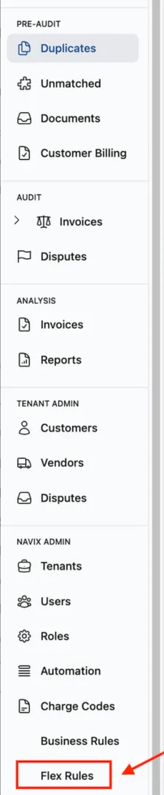
Add Flex Rules to Left Navigation
- Flex Rules has been added to the left navigation panel in the UI
- Provides quicker and more direct access to the rules engine from the main application
- Reduces navigation friction and improves discoverability for users managing rules
Tai Integration MVP
- Completed initial MVP development for the Tai integration
- Delivered end-to-end support for:
- Invoice ingestion into Navix
- Audit & Documents outbound processing
- Integration work includes:
- Mapping approved invoices back to the Tai TMS
- Mapping Tai Loads to Navix Orders
- Establishes the foundation for bi-directional data flow between Tai and Navix
Tai Integration Updates
Updated payment terms sourcing logic to correctly handle Remit To scenarios:- When a Remit To vendor is present, Payment Terms are now pulled from the Remit To vendor ID
- If the Remit To vendor is the same as the Carrier, Carrier Payment Terms are used
- Enhanced the Get Audit Results endpoint to include vendor Payment Terms
- Addresses gaps for TMSs that require an invoice Due Date to be provided via API at creation time
- Previously:
- Audit results did not expose vendor payment terms or invoice due dates
- Consumers needed to make an additional API call to fetch carrier details
- With this update:
- Vendor PaymentTerms are included directly in the audit results
- Consumers can calculate invoice due dates using:
- Payment terms
- Existing created or approved dates already present in the schema
- Reduces API overhead and eliminates a key integration blind spot
Rating Engine: Add Dimensions to Line Items
- Enhanced the rating engine webhook to include dimensional data on line items
- Previously, dimensional attributes were missing from the webhook payload
- Due to schema differences between:
- Orders (which use an
Items.Dimensionsstructure), and - The Rating Engine (which already includes weight fields directly on
LineItem) - Dimensional fields are added directly to the
LineItemobject for consistency
- Orders (which use an
- Newly supported line item attributes include:
- Height
- Width
- Length
- Stackable
- Improves rating accuracy and enables better support for dimension-based pricing models
Automated Email Whitelist Setup
- Introduced automation for configuring email whitelabel and whitelist settings
- Replaces manual, developer-driven setup for each new email whitelabel request
- New issue templates now collect all required inputs upfront
- Configuration is automatically applied using the Navix CI bot
- Reduces turnaround time, eliminates repetitive work, and improves consistency
Improved Vendor Filter Search Performance in Customer Billing Queue
- Addressed slow performance when searching for Vendors in the Customer Billing queue
- Previously, users experienced noticeable delays between typing a vendor name and seeing updated results
- Performance improvements have reduced search response times to under one second
- Applies across all tabs within the Customer Billing queue
- Results in a faster, more responsive filtering experience
🐞 Optimizations
Document Sync: “Has Signature” Not Propagated to Invoice
- Identified an issue where documents containing a signature did not correctly reflect Has Signature = Yes when viewed from the Invoice
- Ingested documents correctly showed the Yes Signature notation
- The issue occurred when:
- Documents were synced from the Order after the Invoice was set to Ready
- At the time the Invoice was marked Ready, the Order had no documents
- A secondary document relation update endpoint was identified:
- This endpoint performs an additional sync
- Signature and Signature Date values were not being assigned during this step
- The logic has been updated to ensure:
- Has Signature and Signature Date are correctly applied during all document sync paths
- Invoice documents accurately reflect signature status
Prevent Accessorial Mapping to Unmapped Charge Types
- Identified a scenario where invoice accessorial charges could be automatically mapped to a charge type that does not have a corresponding tenant charge code
- This can occur with the recent enhancement to automatically map invoice charges
- Updated behavior ensures:
- Charges are not automatically mapped to charge types that lack a tenant-specific charge code
- Prevents unintended or invalid charge assignments
Weight and Inspection Certificate Document Type Returned as Unset
- Identified a document type mapping mismatch for Weight and Inspection Certificate documents
- Each system used a slightly different enum value for the same document type
- When retrieving documents via – Get Document:
- The document type was returned as Unset due to the mismatch
- The fix combines both versions of the document type enum:
- Ensures a valid document type is returned regardless of source
- Prevents document type loss when retrieving documents
📊 Reports
(No report updates added yet)