![Navix Logo - Purple-1.png]](https://hs.navix.io/hs-fs/hubfs/Navix%20Logo%20-%20Purple-1.png?height=50&name=Navix%20Logo%20-%20Purple-1.png)
Enhancements:
New Terminate Reason Added
Email Agent - Payment Status Replies
Portal Uploads Product
IDP Improvements
Orderless Invoice Improvements
Mass Actions Migration
Auto-Dispute Status Added to Dispute Queues ViewEnhanced Customer and Vendor Master Search
Integrations:
Revenova - Order Approval Update Failures Now Reported on the Load Disputes API - “Create Communication” Endpoint Updates
Optimizations:
Destination Missing in Documents Tab on Invoice
Auto-Disputes Email Subject and Email Signature
Next Record Navigation in RTA Queue Directing to Analysis Tab
Reports:
Timeline Dashboard - Customer Billing
🚀Enhancements
New Terminate Reason Added
- The following new Terminate Reason has been added:
- Truck Ordered Not Used
- Truck Ordered Not Used
Email Agent - Payment Status Replies
- The Email Agent can now reply to Payment Status emails (e.g., “Has invoice X been paid?”, “When is payment scheduled?”, “Can you confirm remittance?”). Previously, these emails were identified but not answered
- Replies are based on the current state of each load at the time the email is received, whether the email is a Payment Status or Rate Verification request, such as:
- Not yet delivered
- Delivered, no invoice received yet
- In Audit
- Approved, before or after the payment due date
- Paid, including payment date, reference and total
- Emails that reference multiple loads or invoices receive one line per load, reflecting each load’s current status
- Short pays (payments less than the approved amount) are routed to a user to reply
- Payment data is currently available for McLeod customers only
- As with Rate Verification, replies will start as drafts for review before moving to auto-send
Portal Uploads Product
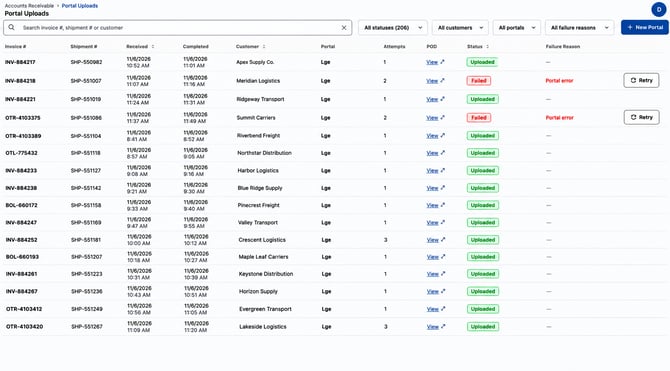
- Portal Uploads UI Enhancements:
- Shipment Number column added to the grid
- New filters added:
- Customer
- Portal
- Failure Reason
- Clicking the “View POD” link now properly displays the uploaded documents in the standard document viewer modal
- Portal Credentials UI Enhancements:
- All fonts have been standardized in the UI
- The search bar now supports searching by login
- Columns are now sortable
- Updated the Navigation Bar with the following changes:
- Added “Accounts Receivable” section
- Moved Portal Logins tab to its own dedicated page and renamed it “Portal Credentials”
- Completed “Portal Uploads” page, which serves as the customer-facing UI for upload visibility and potential failure workflows
- Created “Portal Requests” page and workflow
- For any new portals that a tenant would like Navix to support, they can now click the “New Portal” button on the Portal Uploads screen, which will direct them to the intake form
- Users can also access the “Portal Requests” page and click the same button
- For any new portals that a tenant would like Navix to support, they can now click the “New Portal” button on the Portal Uploads screen, which will direct them to the intake form
-
- The portal intake form is intended to quickly gather portal information from the tenant:
- Login URL
- Credentials
- Expected volume per month
- Customer(s) involved
- Workflow that needs to be supported - Upload only vs Rate Verification + Upload
- Portal recording of the workflow being manually completed
- Users can then see the status of their requests by viewing the “Portal Requests” page
- Implemented a Tenant Setting for the Portals Product that allows for tenant-specific email subject line formatting
- The portal intake form is intended to quickly gather portal information from the tenant:
IDP Improvements
- Commercial Invoice Matching
- Some payable invoices don’t look like traditional freight bills, such as carriers that list goods as line items or vendors that bill for non-freight services like warehousing. Previously, IDP classified these as Commercial Invoices, which are attached to the order but not matched for payment
- IDP now extracts data from these documents and promotes them to an Invoice when both of the following are true:
- The vendor on the document matches a vendor on the matching order
- The Bill To on the document matches the tenant’s name
- Promoted documents are matched as invoices and renamed accordingly. An IDP Audit Trail entry records why the document was promoted
- Documents that don’t meet both conditions continue to be attached as Commercial Invoices, as they are today
- In testing, this caught the large majority of commercial invoices that previously had to be fixed by hand, with no incorrect promotions
- This feature is turned on by default
- Updates to LLM Math Check
- The LLM Math Check reconciles extracted charge lines against the invoice total and currently corrects ~150 invoices per day
- Upgraded to a newer AI model, which improves accuracy and returns more consistent results when the same invoice is processed again
- Improved handling of common invoice scenarios:
- Payments and credits printed on the invoice are now captured as negative charge lines, so charges reconcile to the Balance Due
- Late fees or interest that only apply if paid after a certain date are never added
- Credit memos and “do not pay” documents are sent to review
- Updated review rules:
- When extraction misreads the invoice total (e.g., $4.69 on a $4,690 invoice), the total can now be corrected automatically, but only when the charge lines already add up to the corrected total with high confidence
- Invoices with multiple copies printing different amounts will continue to go to review
- A total of $0 or less is never applied automatically
- In testing, these changes automatically resolved over half of the invoices that previously failed validation
Orderless Invoice Improvements
- An “Orderless” badge now displays at the top of the Invoice Detail page so users can quickly identify orderless invoices
- Users can remove the orderless designation directly from the badge, which moves the invoice back to the Unmatched Invoices queue
- A confirmation message now displays when adding an order number to an orderless invoice matches it to an order, or when removing an order number unmatches it
- After assigning a customer and marking an invoice as orderless, users are automatically advanced to the next invoice in the Unmatched Invoices queue
- The “IsOrderless” flag is now available in the Rules Editor simulator
- “Orderless Audit” and “Orderless Ready to Approve” have been added as options in the Queue filter on the Invoices > All page
- Unmatched Invoice - Reference Numbers Expanded by Default
- The Reference Numbers section is now expanded by default in Unmatched Invoice Details, since it’s the key information needed to match an invoice
- This saves users a click on every unmatched invoice, as the section was previously collapsed by default
Mass Actions Migration
- All invoice mass actions now support up to 1,000 invoices at a time (previously 100):
- Mass Re-Audit
- Mass Terminate
- Mass Assign Owner
Auto-Dispute Status Added to Dispute Queues View
- A user previously had to click into a specific Dispute record in the Disputes queue to see what the Auto-Dispute status was. This didn’t allow users to easily see any failed Auto-Disputes at the queue grid view
- The Auto-Dispute Status is now displayed in the grid view for the following Dispute queue tabs:
- Unassigned
- All
- My Disputes
Enhanced Customer and Vendor Master Search
- Search on the Tenant Admin > Customers and Tenant Admin > Vendors screens is now significantly faster, especially for tenants with large vendor lists
- Users can now search by Customer or Vendor ID (e.g., “V0000000155”), in addition to name, DOT #, MC # and SCAC
- The search box hint has been updated to show the searchable fields: “Search by name, ID, DOT #, MC # or SCAC”
- Address, City, State and Zip are no longer searchable, but still display in the grid
🔗 Integrations
Revenova - Order Approval Update Failures Now Reported on the Load
- When an order is approved in Navix, the matching load in Revenova is updated (POD and customer invoice documents marked as received, customer quote set to Approved, and fleet loads marked Completed)
- Previously, if Revenova rejected part of this update, nothing was shown on the load to explain why, which could leave the load partially updated
- Order Approval now works the same way as Invoice Approval:
- Revenova’s reason for the rejection is written to the load’s Accounting Notes so the issue can be identified and corrected directly on the load
- Example: “Navix Approval Error: Departure Date is Required for the Last Stop. Return to the Last Stop and enter a departure date.”
- Any parts of the update that Revenova accepts are still saved, such as marking the POD and invoice documents as received and setting the quote to Approved
- Revenova’s reason for the rejection is written to the load’s Accounting Notes so the issue can be identified and corrected directly on the load
- No note is written if the load is already Completed or On Hold in Revenova
Disputes API - “Create Communication” Endpoint Updates
- The “Create Communication” endpoint has been updated to support customers who send and receive dispute emails outside of Navix
- New “To”, “From” and “Cc” fields have been added, each accepting a list of email addresses, consistent with the “List Communications” endpoint
- Files can now be attached to a communication through the endpoint
- Attachments must be PDFs, consistent with current dispute functionality
- Uploaded files appear in the UI the same way attachments on dispute emails do
🐞Optimizations
Destination Missing in Documents Tab on Invoice
- It was reported that the Destination Stops and associated data were missing in the Documents Tab for an Invoice record
- This has since been corrected and the Destination Stops are once again displaying on all Invoices as expected
Auto-Disputes Email Subject and Email Signature
- There was a disconnect between the communication template included in the Auto-Dispute Exception Node in Flex and the email subject line that was actually being sent when each Auto-Dispute triggered
- The email subject line wasn’t including all the necessary information that is included in the email communication template itself
- Additionally, the email signature was not populating as expected in the actual Auto-Dispute email communication being sent
- Both of these issues have since been corrected and are working as originally intended
Next Record Navigation in RTA Queue Directing to Analysis Tab
- When a user tried to use the “Next Record” button while viewing a record in the Ready to Approve queue, instead of moving to the next record in the queue, the user was sent to the main view in the Analysis queue
- This was not the expected behavior and has since been fixed
📊Reports
Timeline Dashboard - Customer Billing
- Recent updates were made to offer the following options for the “Date Filtered On” filter:
- Order Approved Date (default)
- Order Created Date