![Navix Logo - Purple-1.png]](https://hs.navix.io/hs-fs/hubfs/Navix%20Logo%20-%20Purple-1.png?height=50&name=Navix%20Logo%20-%20Purple-1.png)
Enhancements:
Charge Code Mapping (Override)
Create Non-Emailed Dispute with Contacts
Alvys: Stop dead-lettering loads that fail mapping due to incomplete TMS data
IDP Updates
Automate Non Blocking Work Instructions
Bill To Column added to Unmatched Invoices grid
Alvys New TMS Integration
Turvo - Settlements 2.0
Revenova - Skip Rate Updates When Total Matches
New Navix Charge Types
Separate Re-Audit and Re-Rate
Optimizations:
Fix filter for "Status" field on Flex Rules
Flex Rules Lowercases Column Names When Importing
Alvys order ingestion halts permanently for active tenants — orders stop reaching Navix and never resume
🚀Enhancements
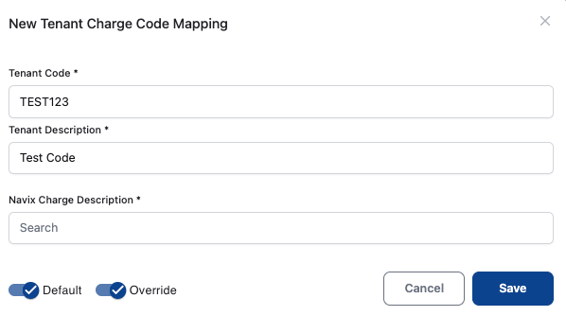
Charge Code Mapping (Override)
- When onboarding a new tenant, the Navix implementation team is responsible for mapping charge codes, a process that routinely involves 100+ individual mappings. Today, the Override toggle can't be set at the time a new mapping is created; it must be configured separately afterward, requiring the team to revisit each applicable mapping with additional clicks. This creates meaningful cumulative inefficiency during an already labor-intensive onboarding workflow.
- The solution: add an Override toggle to the "Add Charge Code Mapping" modal alongside the existing Default toggle, allowing implementation specialists to configure both values in a single step. This eliminates a repetitive, error-prone secondary task and accelerates tenant onboarding with minimal engineering lift.
- If it's an initial mapping of a tenant code to a Navix Charge Type: Default toggle = On, Override toggle = On
- If it's any other mapping of a tenant charge code to a Navix Charge Type where Default is already present: Default toggle = Off, Override toggle = On
Create Non-Emailed Dispute with Contacts
- Users are now able to assign a contact to a dispute that they'll distribute internally through their own communication tools, without Navix sending an email.
- Previously, when a dispute group was configured with "Allow Email = No," the system blocked users from adding an email address in the UI when creating a dispute.
- Users want the ability to add contacts that their API can use to route to the appropriate contact on their end, even though no email is sent (adding a contact remains optional, not required).
- This capability is now supported in the Navix UI.
Alvys: Stop dead-lettering loads that fail mapping due to incomplete TMS data
- Previously, a load couldn't be mapped to a Navix order when Alvys data was missing or unrecognized (e.g., no load number, no customer payment terms, unknown stop type, unmappable billing terms), causing it to be dead-lettered.
- This issue has since been corrected.
IDP Updates
- A new Rate Confirmation analyzer was promoted to Production, including: Layout Analysis removed (wasn't helping accuracy), unnecessary fields removed, and cost of Rate Confirmation extraction cut in half.
- A new Carrier Invoice analyzer and Factoring Invoice analyzer were both promoted to Production, including: Layout Analysis removed from both (wasn't helping accuracy), unnecessary fields removed, and InvoiceTotal flattened (now a single field — previously used InvoiceTotal.Amount and InvoiceTotal.Currency, but currency isn't needed anymore).
- Prompt updates were made to both the Carrier and Factoring Invoice analyzers:
- Factoring Invoice analyzer: previous accuracy 93% → new accuracy 97.8%
- Carrier Invoice analyzer: previous accuracy 92.5% → new accuracy 95%
Automate Non Blocking Work Instructions
- An update has been made to how Non Blocking Work Instructions behave when they are the ONLY work instruction on an Invoice that also doesn't have any exceptions.
- Previously, even a Non Blocking Work Instruction would still stop an Invoice from being touchless in Navix — it just didn't require a user to attest to it.
- Now, only Exceptions or Blocking Work Instructions will stop an Invoice from being touchless. Non Blocking Work Instructions will still display when either an Exception or Blocking Work Instruction also exists, but a Non Blocking Work Instruction won't stop an Invoice in Audit by itself.
Bill To Column added to Unmatched Invoices grid
- An update has been made to the Unmatched Invoices grid in the Navix UI — "Bill To" has been added as a new column, displaying the Bill To Name value for each record.
-1.png?width=670&height=223&name=image%20(33)-1.png)
Alvys New TMS Integration
- Another TMS Integration has been completed and is fully functional with Navix — the development work required for the Alvys Integration is finished.
Turvo - Settlements 2.0
- Turvo offers Settlements 2.0 as a solution for users to create an Invoice entity within the TMS. Work was completed so that Navix is now compatible with Turvo tenants using both Settlements 1.0 and 2.0.
Revenova - Skip Rate Updates When Total Matches
- Previously, every invoice approval in Navix caused the Revenova integration to delete and recreate all carrier and customer rate records — even when the rates hadn't changed — which triggered unnecessary "rate changed" notifications and confusion for Revenova users.
- Navix now compares totals before sending updates and skips rate (and accessorial) updates when the carrier and/or customer totals match, eliminating that noise.
- When an order has multiple customer quotes, Navix now skips all customer-side rate and billing actions to prevent duplicate charges and incorrect rate data across quotes — matching how the Turvo integration already handles this scenario.
New Navix Charge Types
- Two new charge types have been added
- Container Freight Station
- Exhibition or Convention Center Pickup
Separate Re-Audit and Re-Rate
- The Re-Audit and Re-Rate actions are no longer tied together in the Navix UI — a user can complete these actions separately if they desire.
- Re-Rate is only applicable and displayed in the UI for tenants who have a rating engine integration.
- The final step for this work is to support mass actions. Currently, if a user clicks the mass action buttons in the UI, it locks until all selected records are processed. The final phase will allow the user to continue using the UI without having to wait for all mass-action-selected records to complete.
-1.png?width=670&height=438&name=image%20(34)-1.png)
🐞Optimizations
Fix filter for "Status" field on Flex Rules
- Previously it wasn't possible to filter to only "Active" Flex rules because the filter used contains logic rather than startsWith. As a result, searching for "Active" rules would also show Inactive rules in the grid.
- This filter has been updated to work as expected.
Flex Rules Lowercases Column Names When Importing
- Flex Rules was consistently changing the casing of column names when importing an Excel file (often for Decision Tables).
- This casing change was causing the following settings to be cleared for the Decision Table node:
- Single/Collect
- Passthrough
- Output Path
- This has since been corrected.
Alvys order ingestion halts permanently for active tenants — orders stop reaching Navix and never resume
- Order ingestion from Alvys stops completely for an affected tenant and does not recover on its own. Once it stops, no new or updated orders flow into Navix from that tenant's TMS.
- Vendor invoices for those loads then arrive with no matching order, so they cannot be rated or audited and stall in the queue until someone notices and the service is fixed and redeployed.
- Expected behavior after fix: Reconciliation now respects the vendor's 50-item limit and splits large batches across multiple requests, so that a busy tenant is ingested completely and continues to advance.
📊Reports
- No Reporting updates to share in this release