![Navix Logo - Purple-1.png]](https://hs.navix.io/hs-fs/hubfs/Navix%20Logo%20-%20Purple-1.png?height=50&name=Navix%20Logo%20-%20Purple-1.png)
🚀Enhancements
New Audit History Events being Logged
- The following events are now being logged and visible in the Audit History section when applicable
- Copy Vendor from Order
- Copy "Remit To" from Order
New Vendor Matching Logic
- Navix has updated the logic in place for Vendor Matching to lead to better matching performance and higher automation rates for tenants
- These are the new steps:
- Check whether the invoice has a vendor name on it. If it doesn't, there is nothing to compare and the vendor is left unchanged
- Check whether the vendor currently on the invoice is already one of the order's carriers. Previously this step only checked whether the vendor had been set by an alias, which meant incorrect vendors were left in place — now an incorrect vendor continues through the remaining steps
- Check whether the alias list recognizes the invoice's vendor name. This lookup is limited to the carriers on the matched order, so it cannot return a vendor unrelated to that order
- Compare the vendor names on the document against every carrier on the order. This step uses the new matching algorithm and now evaluates every vendor name IDP identifies during ingestion, rather than only the first name found. The first match wins
- If nothing matches, the vendor is left as-is on the invoice and flagged for manual review
IDP - LLM Signature Check
- Navix has replaced the signature detection stack that was previously used for capturing signature value on documents with a single vision LLM
- The expectation and intention of this change is to significantly increase the accuracy of signature detection
- The new signature detection model is designed to better identify handwritten signatures with faint marks, initials, and signatures inside receiving stamps that the previous system routinely missed
DD-MM-YYYY Date Americanization
- Some countries format their dates in the DD/MM/YYYY format, and when IDP reads this format it doesn't always adjust properly. For example, an invoice dated June 10th, 2026 may be ingested as 10/6/2026 (October 6th) and set the due date to November. This can falsely trigger internal business rules and sometimes even auto-termination of the record
- New logic has been implemented to trigger immediately after an Invoice and Order match:
- Invoice Ship Date and Invoice Delivery Date are evaluated against the Order Ship Date and Order Delivery Date
- There is a 30 day threshold in place, so if the ingested dates are greater than 30 days different from the Order dates, we will flip the day/month values in the dates to correct them to be accurate and within the 30 day threshold
- If after flipping the day/month values the dates are still not within a 30 day threshold of the Order dates, the original ingested values will be kept
Margin Calculator V2
- Freight brokers agree to a margin with their shipper at the time of the original order. But the carrier invoice frequently arrives different from the original order — reweighs, reclasses, fuel changes, additional/deficit weight, and accessorial adjustments all change the vendor cost after the fact
- When the vendor cost changes but the customer rate doesn't, the margin the broker actually earns drifts away from what was contracted. Previously, correcting this required the user to:
- Look back at the original Order charges to figure out what margin was originally embedded
- Do the math by hand (margin% = (customer − vendor) / customer) across a mix of base rate, fuel, discount, and weight-based charges
- Manually re-apply that percentage to the new vendor-adjusted totals — and get the "true margin" formula right, not a simple markup
- Pain points this creates:
- Margin leakage — every manual re-rate is an opportunity to under-bill and lose contracted profit
- Time cost — margin re-calculation is repeated on a large share of invoices, since re-rated carrier invoices are common, not exceptional
- Inconsistency — different users compute margin differently (markup vs. true margin, which charges to include), producing inconsistent billing
- Low confidence — teams can't easily verify that what they're billing matches the deal they made
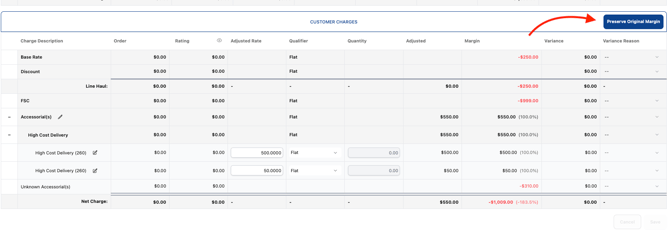
- Margin Calculator V2 was built to preserve the original margin. See below for how it works:
- In the Margin Calculator, the user selects "Preserve Original Margin" as the application type (alongside the existing Linehaul Only, All Charges, and Selected Charges options)
- Navix calculates the margin from the original Order charges (customer vs. vendor) and pre-populates the margin percentage automatically
- By default, only the charge types that typically define contracted margin are included in the calculation: Base Rate, Discount, Fuel (FSC), Additional Weight, Deficit Weight, and Reclass
- The preview shows checkboxes that let the user add or remove charges from the calculation in real time. As the selection changes, the detected margin percentage recalculates automatically
- The user reviews the live preview (new customer costs, margin per line, subtotals, grand total) and clicks Apply Margin to update the customer charges
-1.png?width=670&height=528&name=image%20(39)-1.png)
Orderless Invoices
- The ability to auto-assign a customer to an Orderless Invoice is now available. This solution works directly through the Flex Rules Engine and can easily be maintained using a Decision Table within the specific rule
- Additionally, development work has been completed to support triggering business rules on Orderless Invoices
New Reference Number Enum Added
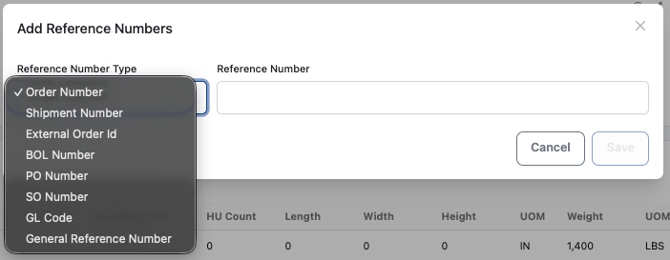
- There is now a "GL Code" Reference Number Type that can be used in Navix
New Variable for Communication Templates - [ADJUSTEDNETCHARGE]
- Tenants can now use the [ADJUSTEDNETCHARGE] variable within a Dispute Communication Template to auto-populate the associated value
- In cases where a user is simply looking to send communication to a Dispute Party about a rate discrepancy, and intends to immediately close the dispute without needing a reply, this new variable could be useful
- The [INVOICENETCHARGE] variable also exists, however if a user is planning to complete the audit before sending the communication to notify the Dispute Party about a short pay scenario, the [ADJUSTEDNETCHARGE] variable would be a better fit
- 💡 Coming soon: The Navix team is currently scoping work for a "Notify and Approve" concept within the Disputes Workflow. "Notify and Approve" would give the user the ability to send a dispute, automatically close the dispute, and automatically approve the invoice all in one click. More details will be shared once this feature is released
🔗Integrations
Multiple SCACs per Vendor
- Tenants sometimes receive "Vendor not found" exceptions on EDI invoices. This shouldn't happen, since the EDI 210 is structured data with a clear carrier indicator — the SCAC code
- A vendor may need a different SCAC for EDI than for SMC3
- Development work has been completed to solve this issue with the following:
- New field added to the "Vendor" record that contains an "EDI SCAC"
- This field is optional
- It will be blank for most vendors, and only have a value for the exceptions. For instance, their XPO vendor may have "XPOL" in the existing SCAC field, but "CNWY" in the "EDI SCAC" field
- When we receive an EDI 210 and attempt to identify the vendor based on the SCAC, we'll include both the existing "SCAC" field and the new "EDI SCAC" field
- New field added to the "Vendor" record that contains an "EDI SCAC"
- New field added to the "Vendor" record that contains an "SMC3 SCAC"
- This field is optional
- It will be blank for most vendors, and only have a value for the exceptions
- When we subscribe to SMC3 notifications, if there's an "SMC3 SCAC" for the vendor, we'll use that. If not, we'll fall back to using the vendor's SCAC
- These are tenant-specific settings, so each tenant can have their own set of aliases
- Aliases are stored as data/configuration, and are manageable by tenant admins through the UI
Tai Metadata Fields Added
- The following fields are now included in the ShipmentStatus block
- customerTotal
- customerRateConfirmation
- The following fields are now included in the TransitType block
- VendorTotal
INVOICE_TERMINATED Webhook Created
- A new webhook has been added for terminated invoices
Addresses and Contacts added to Vendor and Customer APIs
- Addresses and Contacts have been added to the newly created Get and Put endpoints for Customer and Vendor
- Contacts
- Name
- Department/Location
- Phone
- Locations
- Address Name
- Address 1
- Address 2
- Country (Enum)
- City
- State (Enum)
- PostalCode
- Address Type
- Headquarters
- Manufacturing
- Bill To
- Warehouse
- IsDefault (true/false)
Sunnybrook & Alvys — Skip documents with Unsupported Types rather than Failing the entire Invoice push
- When an invoice is approved, Navix pushes its documents to the customer's TMS (Sunnybrook or Alvys). Each Navix document type has to be translated into the type name that TMS expects
- Seven Navix document types had no translation configured — most visibly Trip Sheet. When an approved invoice carried one of them, the push did not just skip that document, the entire push aborted. The TMS received none of the invoice's documents, the carrier invoice was never delivered, and for Sunnybrook the proof-of-delivery was never auto-approved. The message then failed permanently and could not be recovered by retrying, requiring manual intervention per invoice. One unrecognized attachment therefore blocked the payment paperwork for the entire invoice
- A fix has been put in place to skip only the unrecognized document and deliver every other document on the invoice as normal when this scenario comes up
🐞Optimizations
Prevent Pagination Freeze in Documents Queue
- An issue was identified within the Documents Queue where at times, the page was not loading properly, nothing was able to be clicked and the page ultimately would become entirely unresponsive
- The root cause was identified and has been fixed. The Documents Queue is consistently functioning as desired now
Copy Remit - No Longer Needs Address
- Previously when a user would click the "Copy Remit to from Order" button, if the Order Remit To didn't have an address, the process of copying the value would fail
- This behavior has been updated so that whatever value is on the Order will get copied to the Invoice, unless the entire Remit To block on the Order is null
Invoice Analysis now shows complete charge comparisons on order-triggered matches
- On the Invoice Analysis screen, invoice charges, order charges, and adjustments are shown side by side so a user can see what the carrier billed, what the order authorized, and the resulting variance. When an invoice was matched to its order after the invoice had already landed in Navix — that is, the match was triggered by the order's arrival rather than the invoice's — only the adjustments were being saved to the analysis record. The invoice and order charge sets were never written
- The result: the Invoice and Order columns came back empty, no variance was calculated, and adjusted amounts appeared detached from their charge lines (often as a standalone "Unknown Accessorial" with no base rate), even though the matched order had the full charge detail on it
- Both matching directions now write the same complete record, so the charge comparison and variance populate correctly regardless of which document arrived first
📊Reports
New Fields added to All Invoices Report
- The following fields have been added:
- Order Remit To
- Vendor Adjusted Net Charge